Portal Overview – Getting Started Guide
Introduction
Welcome to SAS Cleaning Suite.
SAS Cleaning Suite is designed to help cleaning businesses manage daily operations more easily from one centralized platform. Instead of handling schedules, staff communication, client updates, payroll, and reports in different places, everything is connected inside one system.
The platform is divided into different portals based on user roles. Each portal is designed for specific users and responsibilities.
For example:
- Admins manage the entire business
- Managers coordinate teams and projects
- Cleaners complete assigned cleaning tasks
- Contractors manage outsourced work
- Clients monitor services and communicate with your company
All portals work together in real time to help improve communication, reduce manual work, and keep operations organized.
This guide will help you understand:
- What each portal does
- Who uses each portal
- How the portals work together
- How information moves across the system
- Basic workflows inside SAS Cleaning Suite
This article is beginner-friendly and designed for both technical and non-technical users.
What Is a Portal?
A portal is a dedicated workspace designed for a specific type of user.
Each user logs into a portal that matches their role and responsibilities.
For example:
User Type Main Purpose
Admin- Manage the entire business
Manager - Coordinate projects and teams
Cleaner- Complete assigned cleaning jobs
Contractor- Handle outsourced work
Client - Track services and communicate
Each portal only shows the tools and information needed for that specific role. This helps keep the system clean, simple, and easy to use.
How the SAS Cleaning Suite System Works
All portals inside SAS Cleaning Suite are connected together.
This means actions completed in one portal automatically update other parts of the system.
Simple Workflow Example
Lead Created → Client Approved → Project Created → Team Assigned → Cleaner Completes Work → Manager Reviews Work → Client Receives Updates → Invoice Generated
Because everything is connected:
- Admins can monitor operations
- Managers can coordinate work
- Cleaners can receive tasks instantly
- Clients can track project progress
- Payroll and reports update automatically
This reduces paperwork, phone calls, and manual tracking.
Main Portals Inside SAS Cleaning Suite
1. Admin Portal
The Admin Portal is the main control center of the entire system.
This portal is usually used by:
- Business owners
- Operations teams
- Senior administrators
- Office staff
Admins can manage almost every part of the business from one place.
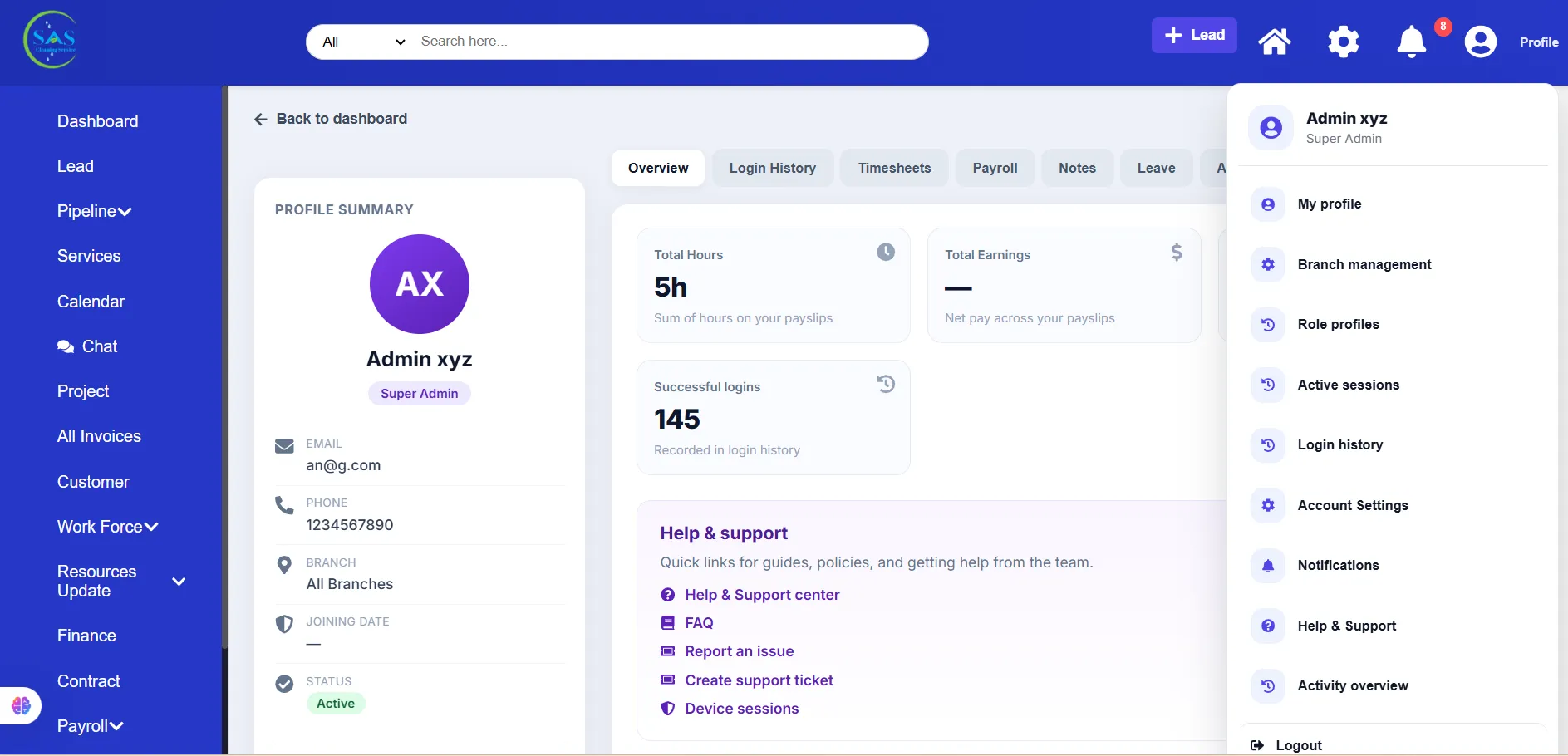
What Admins Can Do
Business Operations
Admins can:
- Create and manage projects
- Monitor schedules
- Track business performance
- Manage daily operations
Staff Management
Admins can:
- Add employees and contractors
- Assign user roles
- Manage permissions
- Monitor attendance and activity
Client Management
Admins can:
- Create client accounts
- Send portal access
- Monitor service history
- Review customer communication
Financial Management
Admins can:
- Manage invoices
- Track payments
- Review payroll
- Monitor financial reports
Support & System Settings
Admins can:
- Configure notifications
- Manage support articles
- Access system settings
- Monitor account security
Admin Dashboard Overview
The Admin Dashboard provides a complete overview of business activity.
Admins can quickly view:
- Active projects
- Staff activity
- Revenue summaries
- Notifications
- Pending approvals
- Inventory updates
- Support requests
The dashboard helps admins make faster decisions throughout the day.
2. Manager Portal
The Manager Portal helps supervisors and team leaders coordinate daily work operations.
This portal is commonly used by:
- Project managers
- Team leaders
- Supervisors
- Branch managers
Managers focus mainly on field operations and staff coordination.
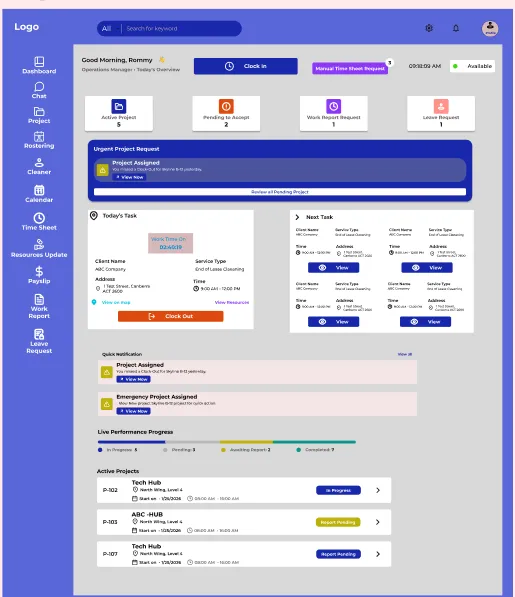
What Managers Can Do
Team Coordination
Managers can:
- Assign tasks
- Schedule teams
- Monitor staff attendance
- Manage daily operations
Project Monitoring
Managers can:
- Review project progress
- Monitor work completion
- Submit reports
- Track task status
Communication
Managers can communicate with:
- Admins
- Cleaners
- Contractors
- Clients (when required)
This helps improve teamwork and reduce delays.
Manager Dashboard Overview
The Manager Dashboard usually includes:
- Assigned projects
- Staff schedules
- Team attendance
- Task progress
- Notifications
- Work reports
This helps managers stay updated throughout the workday.
3. Cleaner Portal
The Cleaner Portal is designed for field staff and cleaning workers.
This portal is made to be simple, mobile-friendly, and easy to use.
Cleaners can quickly access:
- Assigned tasks
- Work schedules
- Clock-in tools
- Job updates
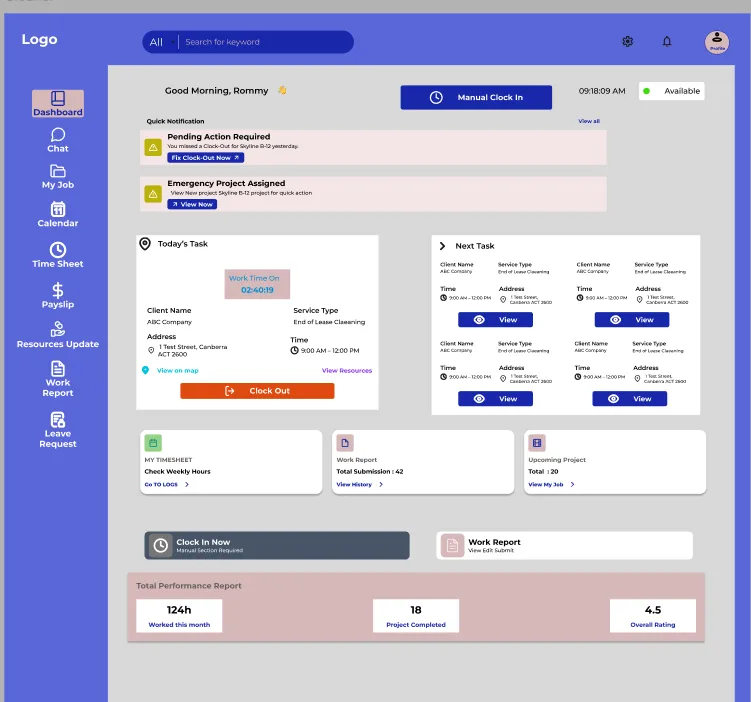
What Cleaners Can Do
View Assigned Jobs
Cleaners can:
- View project locations
- Check schedules
- Review cleaning instructions
- See assigned managers
Clock In & Clock Out
Cleaners can:
- Start shifts
- End shifts
- Track attendance
- Record working hours
This information helps generate accurate payroll automatically.
Submit Work Reports
Cleaners can:
- Upload work updates
- Submit completion reports
- Add notes
- Upload photos if required
Cleaner Dashboard Overview
The Cleaner Dashboard focuses on daily work activities.
Common sections include:
- Today’s schedule
- Assigned jobs
- Clock-in status
- Notifications
- Work updates
The interface is designed to be fast and simple for mobile users.
4. Contractor Portal
The Contractor Portal is used for outsourced workers or external cleaning teams.
This portal helps contractors manage assigned work while staying connected with the company.
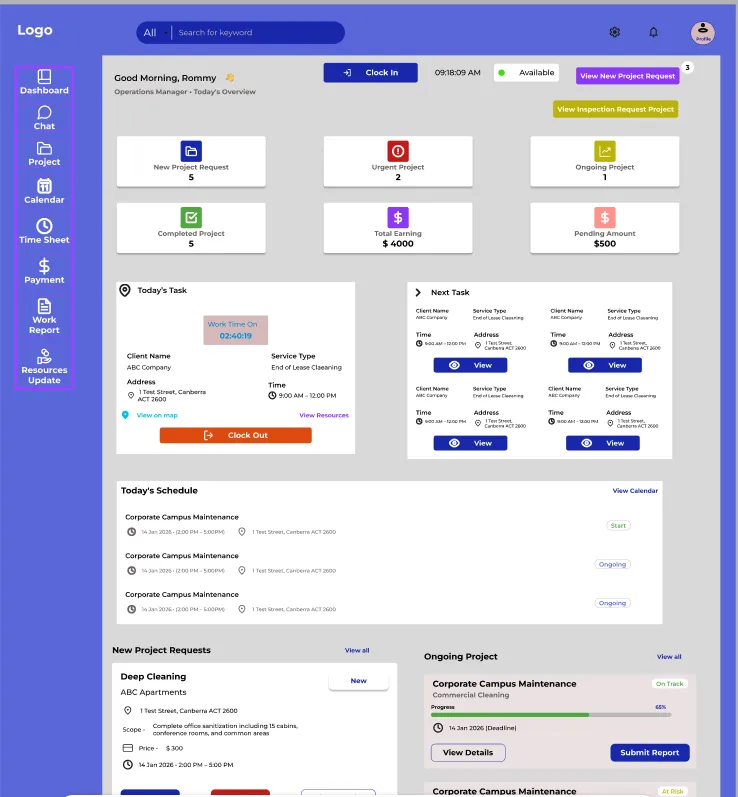
What Contractors Can Do
Contractors can:
- View assigned projects
- Monitor schedules
- Submit reports
- Track attendance
- Communicate with managers
- Upload work updates
This helps companies manage outsourced operations more efficiently.
Contractor Dashboard Overview
The Contractor Dashboard may include:
- Assigned contracts
- Upcoming schedules
- Attendance tracking
- Project updates
- Notifications
This allows contractors to manage work responsibilities clearly.
5. Client Portal
The Client Portal gives customers direct access to their services and project information.
This improves transparency and reduces unnecessary communication delays.
Clients can securely monitor their services online anytime.
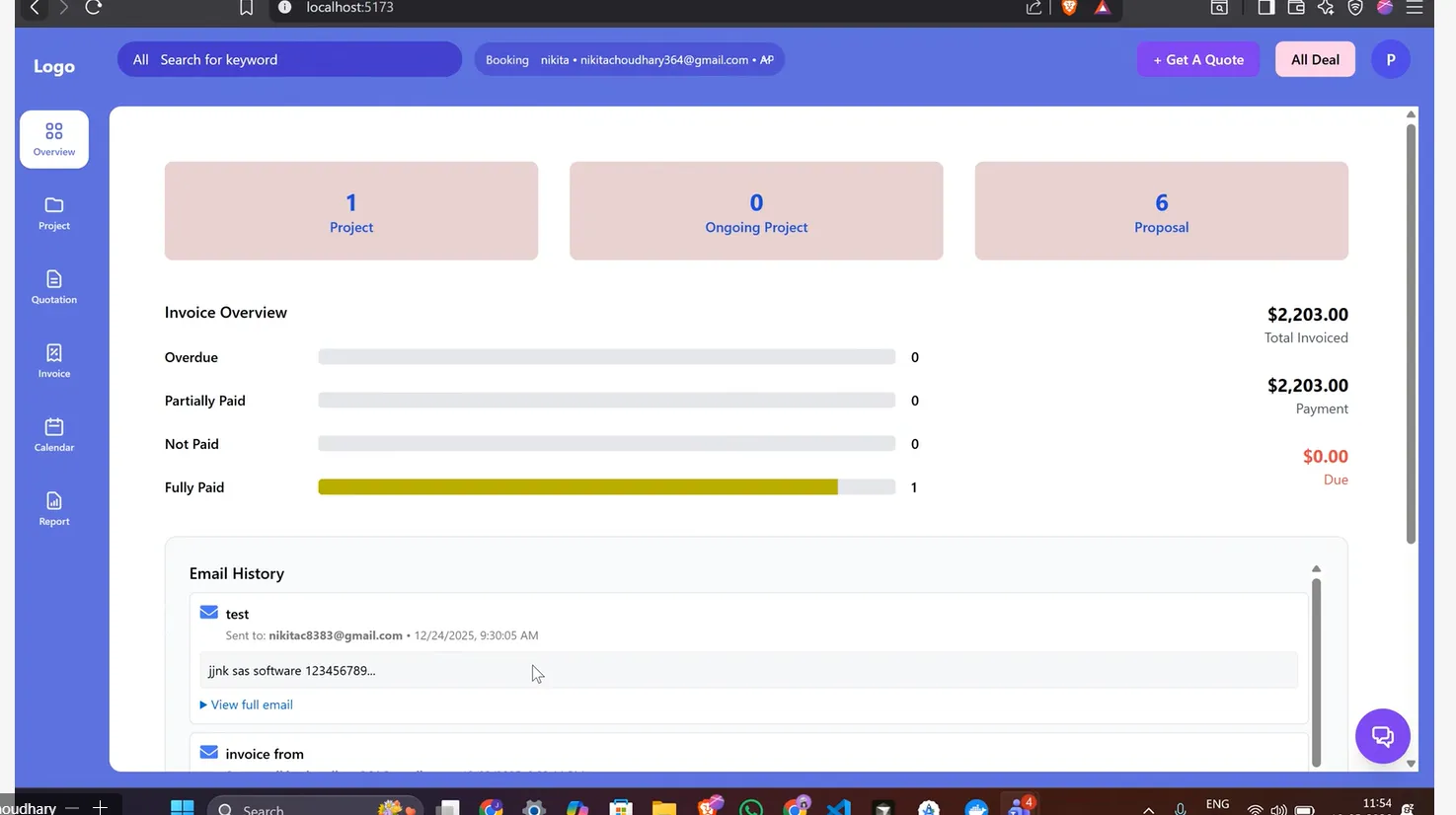
What Clients Can Do
Monitor Projects
Clients can:
- View ongoing projects
- Track cleaning schedules
- Review work progress
Access Documents
Clients can:
- View invoices
- Download reports
- Review quotations
- Access service history
Communicate Easily
Clients can:
- Send messages
- Request support
- Ask service questions
- Submit requests
This creates a smoother customer experience.
Client Dashboard Overview
The Client Dashboard usually includes:
- Active services
- Upcoming schedules
- Invoices
- Reports
- Notifications
- Support requests
This keeps clients informed without needing constant follow-up calls.
How All Portals Work Together
One of the biggest advantages of SAS Cleaning Suite is that all portals stay connected in real time.
Example Workflow
Step 1: Admin Creates a Project
The admin creates a cleaning project and assigns a manager.
Step 2: Manager Assigns Staff
The manager assigns cleaners or contractors to the project.
Step 3: Cleaner Receives the Task
The cleaner instantly sees the new assignment in their portal.
Step 4: Work Is Completed
The cleaner clocks in, performs the work, and submits updates.
Step 5: Manager Reviews the Work
The manager reviews reports and confirms completion.
Step 6: Client Receives Updates
The client can review project progress and reports from the Client Portal.
Step 7: Payroll & Reports Update Automatically
The system updates attendance, reports, and payroll records automatically.
This connected workflow helps businesses save time and reduce manual errors.
Switching Between Portals
Some users may have access to multiple portals depending on their role.
For example:
- An Admin may also act as a Manager
- A Manager may oversee multiple branches
- A Contractor may manage subcontractors
If multi-role access is enabled, users can switch between portals without creating separate accounts.
Steps to Switch Portals
- Open your profile menu
- Select “Switch Portal”
- Choose the portal you want to access
- The system will redirect you automatically
Available portals depend on your assigned permissions.
Benefits of Using Multiple Portals
Using separate portals helps keep the system organized and user-friendly.
Benefits Include
Better Security
Users only access information relevant to their role.
Simpler Experience
Each portal stays clean and easy to use.
Improved Communication
Teams can communicate more efficiently.
Faster Operations
Tasks, updates, and approvals happen more quickly.
Better Transparency
Admins, managers, staff, and clients stay informed in real time.
Daily Workflow Example
Here’s an example of how the portals work together during a normal workday.
Example Daily Workflow
- Admin reviews dashboard updates
- Manager checks daily schedules
- Cleaners receive assigned tasks
- Staff clock in at project locations
- Managers monitor progress throughout the day
- Cleaners submit work reports
- Clients review completed services
- Admin reviews payroll and reports
- Support requests are handled if needed
This workflow helps keep operations smooth and organized.
Best Practices
To get the best experience from SAS Cleaning Suite:
✔ Use the correct portal for your role
✔ Keep login credentials secure
✔ Update information regularly
✔ Review notifications daily
✔ Submit reports on time
✔ Monitor schedules carefully
✔ Keep communication professional
✔ Log out from shared devices
These small habits help improve daily operations and system security.
Conclusion
SAS Cleaning Suite uses connected portals to help cleaning businesses manage operations more efficiently.
Each portal is designed for a specific role, making the system easier to understand, easier to manage, and more organized for everyone involved.
With the different portals, your business can:
- Manage projects more efficiently
- Improve staff coordination
- Track work in real time
- Improve communication
- Reduce manual paperwork
- Deliver a better client experience
By understanding how each portal works, your team can use SAS Cleaning Suite more confidently and effectively every day.